They way I have Intacct set up I need to be able to expand reports by multiple dimensions in one column - for example in a Trial Balance the primary reporting structure is account but within each account I need to be able to expand by department then within the department by class. I can't use the drill feature here, I need the report to show everything for client reporting.
0 Votes
11 Comments
Sorted by
Gabriel Michaudposted
4 months ago
Hi Lisa,
I just sent you an invite for Monday, let me know if the proposed time works.
Gabriel
0 Votes
L
Lisa Beasonposted
5 months ago
I'd love to hop on a call next week - I'm open on Monday after 11am pacific or any time Thursday or Friday.
@Lisa, can you share the exact formula you used? Does the From/To date match the financial year you want to look at? This could explain why all the revenue/expense accounts have been moved over to Retained Earnings.
We can definitely make this look a lot better than it is in my example. The formula I provided does a straight dump on all the combinations, but to get more control on the formatting it will be much better to have individual account rows or groupings, and then do the expansion by class and/or department inside these based on the specific requirements that you have. A layout like the one you shared in your earlier messages is definitely possible.
If/when additional combinations of departments and class get used, the #SPILL! message will show up prompting you to make space for the extra rows. You can leave space ahead of time as well and use the Auto-Hide Zero rows feature.
I'd be happy to jump on a call to go through this with you - i'm attending the Sage Future conference this week and am available next week.
0 Votes
L
Lisa Beasonposted
5 months ago
For some reason, it's pulling all of hte expense accounts as being in 39000 - retained Earnings when I connect to my instance. Also, if it's just going to pivot GL Data I can do that with an export and build it to look more like a standard report so Velixo wouldn't really save me much time there.
0 Votes
Gabriel Michaudposted
5 months ago
Had a chat with my team and they suggested something simple - in cell B4 and B5, instead of putting "*" to get all the departments and classes, we just put *? to also get the null/empty ones.
I also added the "closing" argument to the EXPANDGLHISTORY function so that we only have combinations with a closing balance.
particularly in the P&L some expenses do not require a Department and some do - but they all require an activity. Balance Sheet, most accounts require a Department but not necessarily a Class. And accounts like the Cash accounts don't require either as Cash has to be a 1:1 relationship
0 Votes
Gabriel Michaudposted
5 months ago
The key is to use the SI.EXPANDGLHISTORY() function. I'm on a flight right now and can't record a video demo, but you can see the attached file as an example.
I have attached a pivot table to it to show how you can have a hierarchical view.
One thing that is not handled here are rows with empty/blank department or class. If your system in a way that allows this, let me know and I will revert back with an alternative approach.
all accounts and dimensions that have activity or balances
0 Votes
Gabriel Michaudposted
5 months ago
Thanks Lisa - you want this expansion for specific accounts only, or ALL the accounts in the TB?
0 Votes
L
Lisa Beasonposted
5 months ago
Hi Gabriel -
I need all of accounts and dimensions in the far left column and the amounts in the 2nd column. I've attached a print screen of a part of the TB report I downloaded from the Velixo site and then a secon showing how I would want the yellow highlighted accounts to expand.
0 Votes
They way I have Intacct set up I need to be able to expand reports by multiple dimensions in one column - for example in a Trial Balance the primary reporting structure is account but within each account I need to be able to expand by department then within the department by class. I can't use the drill feature here, I need the report to show everything for client reporting.
0 Votes
11 Comments
Gabriel Michaud posted 4 months ago
Hi Lisa,
I just sent you an invite for Monday, let me know if the proposed time works.
Gabriel
0 Votes
Lisa Beason posted 5 months ago
I'd love to hop on a call next week - I'm open on Monday after 11am pacific or any time Thursday or Friday.
[email protected]
0 Votes
Gabriel Michaud posted 5 months ago
@Lisa, can you share the exact formula you used? Does the From/To date match the financial year you want to look at? This could explain why all the revenue/expense accounts have been moved over to Retained Earnings.
We can definitely make this look a lot better than it is in my example. The formula I provided does a straight dump on all the combinations, but to get more control on the formatting it will be much better to have individual account rows or groupings, and then do the expansion by class and/or department inside these based on the specific requirements that you have. A layout like the one you shared in your earlier messages is definitely possible.
If/when additional combinations of departments and class get used, the #SPILL! message will show up prompting you to make space for the extra rows. You can leave space ahead of time as well and use the Auto-Hide Zero rows feature.
I'd be happy to jump on a call to go through this with you - i'm attending the Sage Future conference this week and am available next week.
0 Votes
Lisa Beason posted 5 months ago
For some reason, it's pulling all of hte expense accounts as being in 39000 - retained Earnings when I connect to my instance. Also, if it's just going to pivot GL Data I can do that with an export and build it to look more like a standard report so Velixo wouldn't really save me much time there.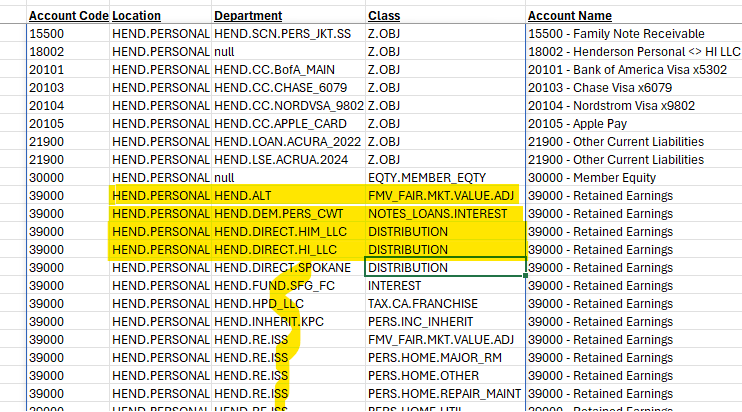
0 Votes
Gabriel Michaud posted 5 months ago
Had a chat with my team and they suggested something simple - in cell B4 and B5, instead of putting "*" to get all the departments and classes, we just put *? to also get the null/empty ones.
I also added the "closing" argument to the EXPANDGLHISTORY function so that we only have combinations with a closing balance.
Updated version is attached.
Attachments (1)
Dynamic TB Demo - with empty dimensions.xlsx
32.7 KB
0 Votes
Lisa Beason posted 5 months ago
particularly in the P&L some expenses do not require a Department and some do - but they all require an activity. Balance Sheet, most accounts require a Department but not necessarily a Class. And accounts like the Cash accounts don't require either as Cash has to be a 1:1 relationship
0 Votes
Gabriel Michaud posted 5 months ago
The key is to use the SI.EXPANDGLHISTORY() function. I'm on a flight right now and can't record a video demo, but you can see the attached file as an example.
I have attached a pivot table to it to show how you can have a hierarchical view.
One thing that is not handled here are rows with empty/blank department or class. If your system in a way that allows this, let me know and I will revert back with an alternative approach.
Attachments (1)
Dynamic TB Demo.xlsx
28.5 KB
0 Votes
Lisa Beason posted 5 months ago
all accounts and dimensions that have activity or balances
0 Votes
Gabriel Michaud posted 5 months ago
Thanks Lisa - you want this expansion for specific accounts only, or ALL the accounts in the TB?
0 Votes
Lisa Beason posted 5 months ago
Hi Gabriel -
I need all of accounts and dimensions in the far left column and the amounts in the 2nd column. I've attached a print screen of a part of the TB report I downloaded from the Velixo site and then a secon showing how I would want the yellow highlighted accounts to expand.
Attachments (2)
velixo tb expanded.png
21.5 KB
velixo tb.png
63.4 KB
0 Votes
Gabriel Michaud posted 5 months ago
Hi Lisa,
Are you looking to have one column per department+class combination, something like this?
If not can you upload an example of how you want it to look?
0 Votes
Login or Sign up to post a comment