When using "DESCRIPTION" as one of the column outputs in the [Select] argument of the SI.Query function, it seems to return the descriptions on journal entries only. Is there a way to include descriptions for other types of transactions such as A/R invoices, A/P bills and credit card transactions? I was hoping to get everything that would appear in the Memo/Description column of a standard Intacct GL report.
0 Votes
Damien Zwillinger posted
10 months ago
Best Answer
Hi Terry
There is no other endpoint we can use, only GLDETAIL.
Each subledger should be posting detail information (including descriptions: DESCRIPTION and ENTRYDESCRIPTION fields) to the GL and should be available through GLDETAIL, but only if Summary frequency in Configuration (of each subledger module) is set to "One per transaction"(e.g. for AP Bill, Bills: One per bill) instead of Daily or Monthly (see below).
Could you please check this is set up like this in your instance, for each subledger. Note that if it wasn't and is only turned on now then it will only apply to new transactions.
If it doesn't work, there is no much we can do using GLDETAIL, it would be a Sage limitation. Note there's a new REST API endpoint coming up in Sage Intacct 2025 R4 that may improve this (and we'd be able to query it thorugh SI.XQUERY).
The other solution that would surface both old and new transactions with Memos/Descriptions is, as you mentioned, to combine the actual subledger tables together. This is defintiely possible, we've built quite a few similar templates that merge data from multiple tables. Please have a look at the LET expression in the AR Transactions sheet of the AR Aging by Customers template for an example (and note our Templates are now downloadable at https://app.portal.com/portal/templates).
I'd be happy to help build this with you if needed (email me directly at [email protected]).
Thanks!
0 Votes
6 Comments
Sorted by
Damien Zwillingerposted
10 months ago
Answer
Hi Terry
There is no other endpoint we can use, only GLDETAIL.
Each subledger should be posting detail information (including descriptions: DESCRIPTION and ENTRYDESCRIPTION fields) to the GL and should be available through GLDETAIL, but only if Summary frequency in Configuration (of each subledger module) is set to "One per transaction"(e.g. for AP Bill, Bills: One per bill) instead of Daily or Monthly (see below).
Could you please check this is set up like this in your instance, for each subledger. Note that if it wasn't and is only turned on now then it will only apply to new transactions.
If it doesn't work, there is no much we can do using GLDETAIL, it would be a Sage limitation. Note there's a new REST API endpoint coming up in Sage Intacct 2025 R4 that may improve this (and we'd be able to query it thorugh SI.XQUERY).
The other solution that would surface both old and new transactions with Memos/Descriptions is, as you mentioned, to combine the actual subledger tables together. This is defintiely possible, we've built quite a few similar templates that merge data from multiple tables. Please have a look at the LET expression in the AR Transactions sheet of the AR Aging by Customers template for an example (and note our Templates are now downloadable at https://app.portal.com/portal/templates).
I'd be happy to help build this with you if needed (email me directly at [email protected]).
Thanks!
0 Votes
T
Terry. holtposted
10 months ago
Ok. thanks!
0 Votes
Gabriel Michaudposted
10 months ago
Terry -- sorry for the delay getting back to you. I just esclated this to the product and templates teams for further review.
0 Votes
T
Terry. holtposted
11 months ago
Hi Gabriel,
Yes, I found that template and it was very helpful. I was hoping to get the descriptions from the transaction lines on the query.
In your screenshot, the description column has the description of the GL batch entry. If you run the same GL Report, but select "DETAILS" instead of "SUMMARY", the report would show the individual memos/descriptions for each line item. This is the information that I was hoping to obtain.
As Harry Lewis hinted at, that info is available in the DESCRIPTION field of the APBILL, ARINVOICE, and other objects. I created a query to pull the DESCRIPTION field on the CCTRANSACTIONENTRY object and got the information I was looking for, but only for credit card transactions, of course.
I am trying to re-create a detailed GL report in Excel. Is it possible? If not possible in one query, is it possible with multiple queries for the different types of transactions and then combining them using Excel functions? The multiple query option would only work if the GL entry query only had direct general ledger entries and did not include the batch entries from the other types of transactions. Thanks!
0 Votes
When using "DESCRIPTION" as one of the column outputs in the [Select] argument of the SI.Query function, it seems to return the descriptions on journal entries only. Is there a way to include descriptions for other types of transactions such as A/R invoices, A/P bills and credit card transactions? I was hoping to get everything that would appear in the Memo/Description column of a standard Intacct GL report.
0 Votes
Damien Zwillinger posted 10 months ago Best Answer
Hi Terry
If it doesn't work, there is no much we can do using GLDETAIL, it would be a Sage limitation. Note there's a new REST API endpoint coming up in Sage Intacct 2025 R4 that may improve this (and we'd be able to query it thorugh SI.XQUERY).
The other solution that would surface both old and new transactions with Memos/Descriptions is, as you mentioned, to combine the actual subledger tables together. This is defintiely possible, we've built quite a few similar templates that merge data from multiple tables. Please have a look at the LET expression in the AR Transactions sheet of the AR Aging by Customers template for an example (and note our Templates are now downloadable at https://app.portal.com/portal/templates).
I'd be happy to help build this with you if needed (email me directly at [email protected]).
Thanks!
0 Votes
6 Comments
Damien Zwillinger posted 10 months ago Answer
Hi Terry
If it doesn't work, there is no much we can do using GLDETAIL, it would be a Sage limitation. Note there's a new REST API endpoint coming up in Sage Intacct 2025 R4 that may improve this (and we'd be able to query it thorugh SI.XQUERY).
The other solution that would surface both old and new transactions with Memos/Descriptions is, as you mentioned, to combine the actual subledger tables together. This is defintiely possible, we've built quite a few similar templates that merge data from multiple tables. Please have a look at the LET expression in the AR Transactions sheet of the AR Aging by Customers template for an example (and note our Templates are now downloadable at https://app.portal.com/portal/templates).
I'd be happy to help build this with you if needed (email me directly at [email protected]).
Thanks!
0 Votes
Terry. holt posted 10 months ago
Ok. thanks!
0 Votes
Gabriel Michaud posted 10 months ago
Terry -- sorry for the delay getting back to you. I just esclated this to the product and templates teams for further review.
0 Votes
Terry. holt posted 11 months ago
Hi Gabriel,
Yes, I found that template and it was very helpful. I was hoping to get the descriptions from the transaction lines on the query.
In your screenshot, the description column has the description of the GL batch entry. If you run the same GL Report, but select "DETAILS" instead of "SUMMARY", the report would show the individual memos/descriptions for each line item. This is the information that I was hoping to obtain.
As Harry Lewis hinted at, that info is available in the DESCRIPTION field of the APBILL, ARINVOICE, and other objects. I created a query to pull the DESCRIPTION field on the CCTRANSACTIONENTRY object and got the information I was looking for, but only for credit card transactions, of course.
I am trying to re-create a detailed GL report in Excel. Is it possible? If not possible in one query, is it possible with multiple queries for the different types of transactions and then combining them using Excel functions? The multiple query option would only work if the GL entry query only had direct general ledger entries and did not include the batch entries from the other types of transactions. Thanks!
0 Votes
Gabriel Michaud posted 11 months ago
Hi Terry,
Is this the field that you are looking for?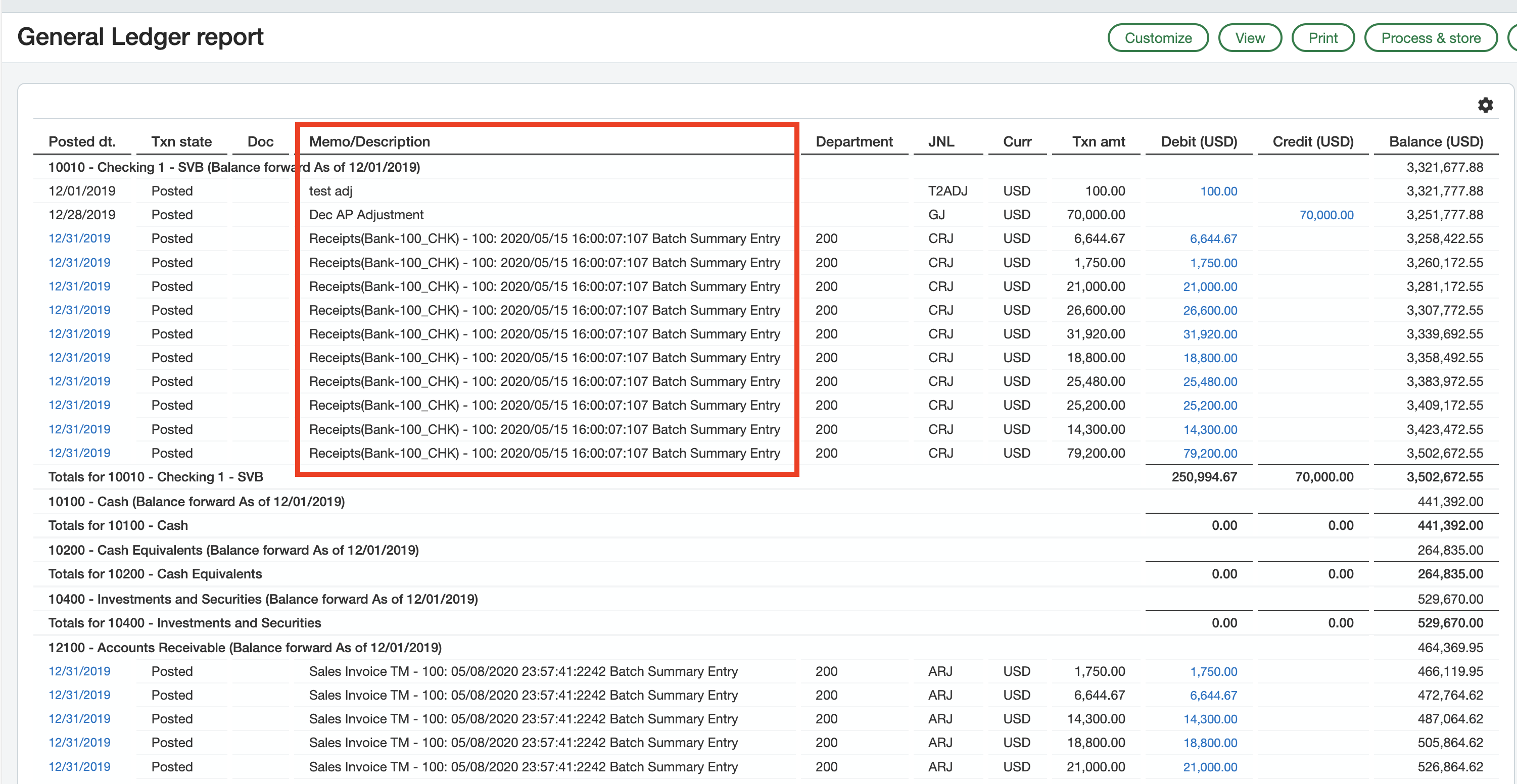
It is named BATCHTITLE in the GLENTRY object.
I don't know if you're familiar with our templates, but we have this one that can be a good baseline for a GL Transaction details report: https://community.velixo.com/support/solutions/articles/153000171653-si-gl-rt12-gl-transaction-details
0 Votes
Harry Lewis posted 11 months ago
Hello.
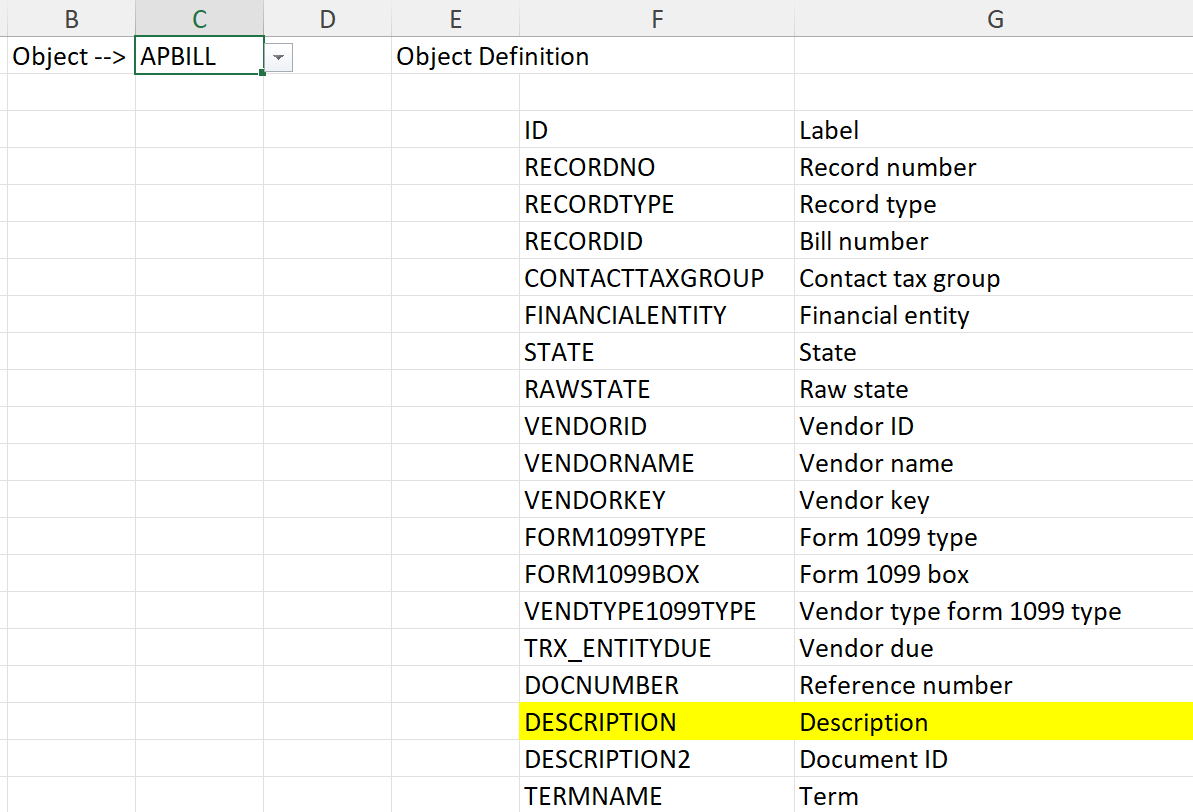
Various Intacct objects contain various field name.
For instance, all the objects you mention (APBILL, ARINVOICE, and CREDITCARD) contain a "Description" field:
Your Sage Intacct partner may have insight into where specific data is located.
0 Votes
Login or Sign up to post a comment